
As is widely recognized, TikTok has taken the youth world by storm. It allows young people to effortlessly express themselves through sharing short videos, captivating their attention and revolutionizing the digital media landscape.
Regularly, we witness that when a well – known platform like traditional social media giants starts to show signs of becoming monotonous and losing their allure among the younger demographic, they often introduce something novel, something “trendy” and “cool” specifically designed to attract the attention of the younger generation. These new features are aimed at capturing the interest of young minds and encouraging them to engage and interact.
YouTube decided to follow a similar strategy. It closely observed the thriving trend on TikTok and clearly realized that to uphold its leading position in the video – creation domain, Recognizing that the youth were deeply immersed in TikTok, YouTube realized it was crucial to capture their attention, which gave rise to YouTube Shorts.
YouTube Shorts was initially launched as a closed – beta version specifically targeted at the Indian audience. This strategic move was a direct response to TikTok‘s ban in India. With TikTok no longer available in the Indian market, a significant opportunity emerged for YouTube. By introducing YouTube Shorts to Indian users, YouTube aimed to convert this untapped market segment into loyal new users.
What Are YouTube Shorts?
YouTube Shorts offers a convenient means for individuals eager to reach a fresh audience. All they need is their smartphones and the Shorts camera integrated within the YouTube app. Similar to TikTok, YouTube Shorts are presented in a vertical format. However, the maximum length of these shorts is 60 seconds.
The shorts can be uploaded through the YouTube Shorts app. Another way is they can also be uploaded as any normal video by tagging #shorts in the description or the title of that video. These videos are arrayed on the stories box under suggested videos on mobile devices.
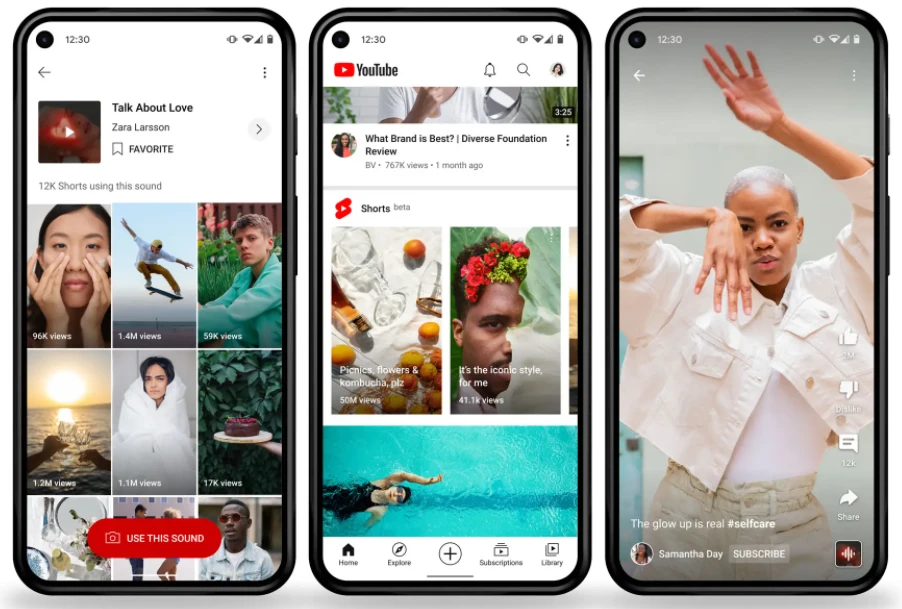
When YouTube Shorts were initially launched in India, creators introduced a special Shorts camera dedicated solely to making short videos. However, this feature was only available in certain regions. Fortunately, India was among those areas, enabling content creators to take advantage of the multi – segment recording function within the Shorts camera integrated in the YouTube app.
Although it is quite like TikTok, containing tools to make 15-second videos as well, by using music clips, speed controls, etc. Most YouTubers are waiting for a more comprehensive rollout of this feature. But until that day, YouTube thrives to make Shorts more and more accessible by letting vertical videos of less than 60 seconds to publish.
How To Create YouTube Shorts?
Creating a Shorts video is simple, and watching one is even easier. In the YouTube Mobile app, click the + icon at the bottom of the homepage and select “Create a Short” to make a short. There’s another way to do it, too.
You can also upload a vertical video under 60 seconds and tag #shorts in the description or title. Using the Shorts feature on mobile offers limited content creation tools. You can speed up recordings and set it for hands – free shooting.
If you choose to upload your shorts in the form of a normal video, then it offers you a little more flexibility to record a vertical video so that you can edit the video just like any normal video along with music, transitions, overlays, and much more. YouTube identifies Shorts videos created using a smartphone, DSLR, iPad, or any other video-recording device for that matter. Your smartphone or desktop computer is enough if you are ready to upload the video.
- Sign in to YouTube on Mobile App.
- Click + button then tap Create A Short.
- Tap on the Record button to start recording.
- Click on Done to preview and edit your video.
- Then, click on NEXT to add more details.
- Finally, tap UPLOAD to upload your YouTube Short.
Conclusion:
In fact, #shorts doesn’t have to be in every video’s title or description. Even without it, YouTube will still classify your under – 60 – second vertical video as a Short. There are no requirements for creating vertical Shorts videos. You don’t even require any prior subscribers or views to make a YouTube Short.